

Playable in browser
今日からお前は
Kyokara Omaeha
- #Web
- #3D
- #Three.js
- #HTML5
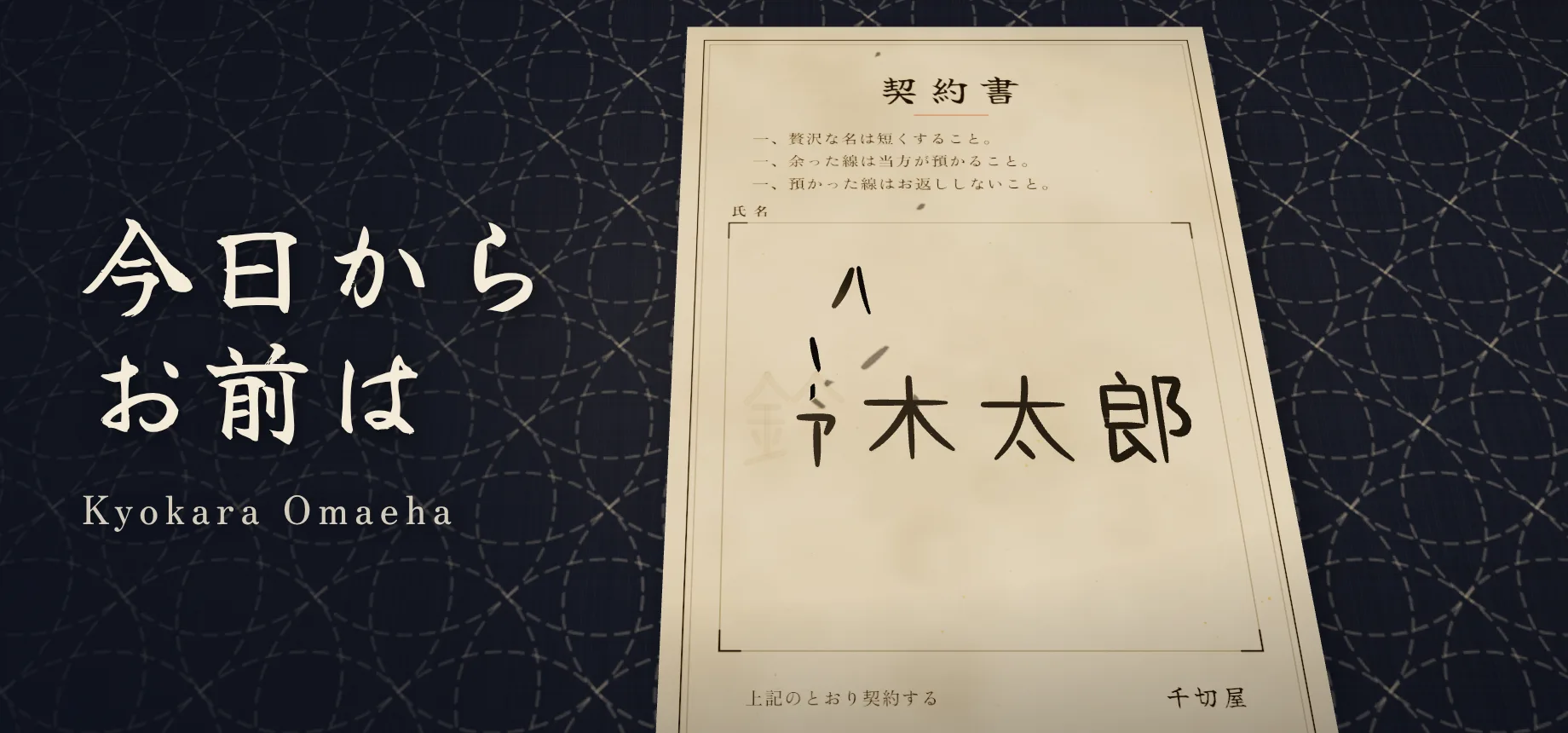
A 3D browser game where you write your name in the signature box of a washi contract with your finger or mouse and press the seal button, only for the Chigiriya proprietor to snip and peel away your extra strokes and rearrange the remaining lines into a new name. One or two characters are built from the strokes you left behind, chosen from kanji (with readings) and katakana. When it finishes, you see your new name, how the stroke count changed, and the percentage of strokes taken, and you can share the result as an image or video.
Official
The official pages of Kyokara Omaeha on CAEN Games are the play page, caen.games/kyokara-omaeha, and the official guide pages (this page and its other language editions). It is 100% free to play with no account required and no play limits. Sites charging fees or using a similar name have nothing to do with the developer. News is posted on the developer's X (@shogo_oomori).
How to Play
Write a name on the contract
Draw inside the name box on the washi contract with your mouse or finger. Moving slowly creates thicker ink strokes, while moving quickly produces thinner lines.
Press Sign
Once you finish writing, press the red Sign button at the bottom. The Chigiriya proprietor snips and peels away the excess strokes and rebuilds the remaining lines into a new name.
Check and share your result
You will see your new one- or two-character Japanese name (with a romanized reading), the stroke count change, and the percentage of strokes taken. Use Share to save or post an image or video, or press Play again as many times as you like.
Controls
- Draw (PC & Mobile)
- Drag with a mouse or trace with one finger inside the name box.
- Zoom & Pan (Mobile)
- Use two fingers to pinch-zoom and pan around the paper.
- Undo, Redo & Clear
- Use the undo and redo buttons at the top right to step backward or forward one stroke at a time. On PC, press Ctrl+Z (⌘Z on Mac) to undo and Ctrl+Shift+Z (⌘⇧Z on Mac) or Ctrl+Y to redo. Press Clear to erase everything.
- Fast-Forward
- Press and hold on the screen during the cutting and renaming animation to fast-forward.
- Audio & Language
- Use the top-right buttons to mute or unmute audio and switch the interface between five languages (Japanese, English, Simplified Chinese, Traditional Chinese, and Korean).
- Share Image or Video
- Open Share on the result card to save, copy, or post your result as a PNG image. On browsers that support H.264 encoding, you can also save or post an MP4 video.
How It Works
Kyokara Omaeha does not translate the meaning of your name. Instead, it analyzes the shapes, angles, and lengths of the actual lines you draw, peels away the excess strokes, and rearranges the leftover strokes into one or two kanji or katakana characters that best match your handwriting.
On the result card, Strokes shows how many separate strokes you drew compared with the stroke count of your new name. Taken (%) measures the share of total drawn line length that was peeled away, which is different from the stroke-count ratio.
You do not have to write your real name—nicknames, Latin letters, symbols, or doodles all work. Even slight changes in size, spacing, or curves can turn the same word into a completely different name.
Popular Names
The top 20 most frequently generated names in the game, updated daily (as of November 20, 2026, across 8,514 unique names).
- ト1,449,299
- ハ427,353
- バ366,867
- イ357,594
- ヘ293,943
- 小292,687
- リ260,837
- ソ242,752
- ド230,472
- ン214,213
- ベ171,475
- 二166,093
- 川156,191
- 仁146,555
- ニ140,499
- 入138,823
- 丁136,319
- ゲ112,329
- レ87,528
- マ86,571
FAQ
- Is Kyokara Omaeha free? Is there any play limit?
It is 100% free with no account required and no limit on how many times you can play. Any website charging money, offering paid plans, or capping free plays is an unofficial copy unrelated to the developer.
- Which website is the official one?
The official pages for Kyokara Omaeha on CAEN Games are the play page at caen.games/kyokara-omaeha and the official guide pages, including this page (caen.games/en/kyokara-omaeha/about) and its other language editions. Other sites using similar names or domains are not affiliated with CAEN Inc. / CAEN Games.
- Can I play on my phone? Do I need to download an app?
Yes, it works on smartphones, tablets, and PCs directly in any modern browser with WebGL support (such as Safari or Chrome). No app download or installation is needed.
- Are my handwritten strokes or real name sent to a server?
No. Everything you draw on the contract is processed locally inside your browser and is never uploaded or stored on our servers. For details on the data measured to improve the game (such as resulting name counts and web analytics), see our Privacy Policy. Note that your original handwriting does appear in the exported share image and video, so avoid writing sensitive personal information if you plan to post it.
- Can I save images or videos and use the game in streams?
Yes. Both individuals and organizations are welcome to post screenshots, videos, and monetized livestreams without prior permission. PNG images can be saved or copied in all browsers, and MP4 videos can be saved when your browser supports H.264 video encoding.
- Why is the Sign button disabled or saying it cannot read my writing?
The Sign button stays disabled until you draw at least one stroke. Dots, overly short marks, or a single plain straight stroke may not provide enough line geometry to form a character—try adding larger, clearer strokes or press Clear and try again.
- Is there a version that creates English alphabet names?
Yes. While Kyokara Omaeha supports five UI languages and always builds Japanese kanji or katakana names (with romanized readings), we also offer Sign Your Name Away, a free English edition that rearranges your strokes into a 1- to 3-letter Latin alphabet name.
Media Coverage
GameWith
贅沢な名前を短く改名!某人気アニメ映画のような体験が味わえるブラウザゲーム『今日からお前は』がSNSで話題に!遊戲基地 Gamebase
寫下名字簽訂契約,系統竟會擅自幫你改名!日本免費遊戲《從今天起你就是》爆紅ハフポスト日本版
Snow Man佐久間大介、人気ギャグ漫画の“キャラ化”してしまう⇒その様子に「朝から笑った」ゴゴ通信
無料ゲーム『今日からお前は』がSNSで大バズり!名前を奪って改名するギミックで100万回プレイ突破電撃オンライン
『千と千尋の神隠し』風に勝手に改名。無料ブラウザゲーム『今日からお前は』が公開中AUTOMATON(YouTube)
勝手に改名される無料ゲーム『今日からお前は』公開。贅沢な名前は大胆削減ファミ通.com
【贅沢な名だね】勝手に改名されちゃう無料ブラウザゲー『今日からお前は』が公開中。書いた名前を奪われて「お前は今日から〇〇だ」電ファミニコゲーマー
契約書に書いた名前が作り変えられるブラウザゲーム『今日からお前は』が登場。どんなに汚い文字も、長文もイラストも、整った1~2文字に勝手に改名されてしまうTogetter
「ブラウザで遊べます」勝手に改名されるゲーム『今日からお前は』がイレギュラーな書き方にも対応していて面白い